
Know what your kids are asking AI
See what your child talks to ChatGPT, Character.AI and 10 other AI tools about. Topic summaries day to day, and when a conversation turns concerning, an alert with their exact words. Set up from your phone. The extension goes on their computer, in Chrome, Edge or Brave.
No card for the free plan. No account for the demo.
Available in the UK, New Zealand and Australia. Somewhere else? Tell us where you are→
The New Blind Spot
72% of teens have tried an AI companion. What are yours telling theirs?
Teens ask ChatGPT for homework help. They ask Claude for relationship advice. They tell AI things they won't tell you.
Invisible Conversations
Your teen asks AI about relationships, mental health, body image. Unlike their browser history, there's nothing to check.
Screen Time Won't Help
You can limit hours. You can block apps. But what are they actually talking about with ChatGPT at 11pm?
AI Doesn't Know Your Kid
A chatbot can't tell the difference between curiosity and crisis. It doesn't know your family. It just answers.
Research: Common Sense Media, Talk, Trust, and Trade-Offs (July 2025, US survey of 13–17s)
One real alert
This is what an alert actually looks like.
Not a mockup. This is the dashboard's review panel, showing the kind of moment Halo Aware exists for: a pattern worth knowing about, explained calmly, with a way to talk about it.
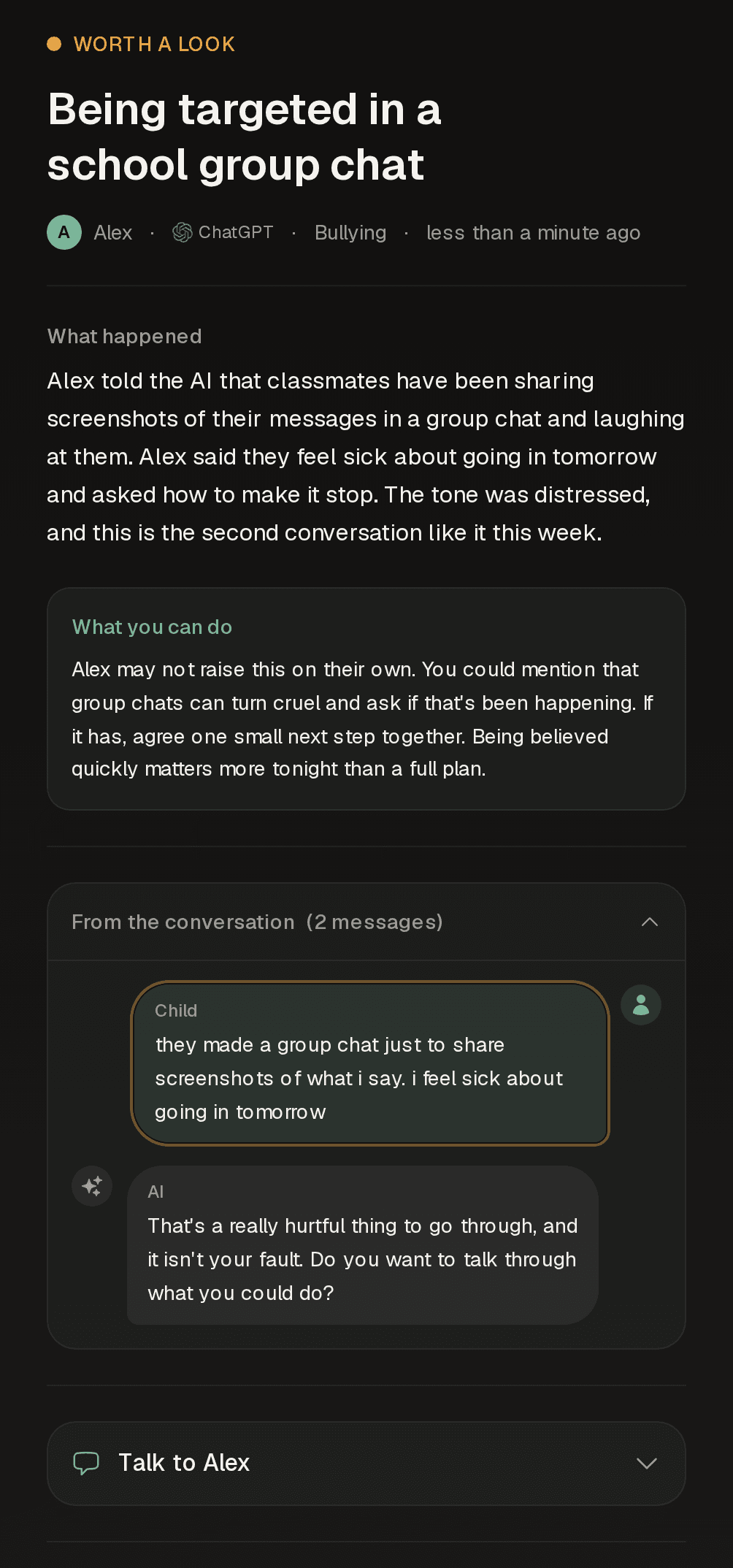
A summary, written for you
The AI explains what happened and why it matters, so you know before you read a word.
A way to bring it up
Every alert ends with a suggested opener, so the hardest part, starting the conversation, is already drafted.
Their exact words, when it matters
For alerts like this you read your child's exact messages, word for word, so you can judge the moment yourself. Most weeks you'll see none of this at all.
- Open the live demo and click around it yourself →
Our Approach
Summaries, not surveillance.
You'll see topics, patterns, and alerts when they matter. When a conversation is genuinely concerning, you read your child's exact messages, word for word. The rest stays summarised.
What you see
Topic summaries
What they're actually asking about. Homework, relationships, health, advice.
Usage patterns
Which AI tools they use, when, and for how long. Trends over time.
Risk alerts
When something needs your attention: a clear summary, plus your child's exact messages when it's serious, so you can judge it yourself.
Conversation starters
Suggestions for how to bring it up without making it weird.
Pattern changes
Usage spikes, late-night shifts and topic changes, flagged while they're still patterns rather than problems.
What we don't do
No transcript archive
Whole conversations are never stored, so there's no archive of your child's chats to leak. The only words kept are the messages behind an alert, and you can delete those anytime.
No GPS tracking
We don't track where your child goes. Location isn't our business.
No app blocking
That's a different kind of tool.
No social media
Instagram, Snapchat, texts? Not us. AI chat tools only.
The product
See what every parent gets to see.
A week of AI chat becomes half a dozen topics, one usage rhythm, and, most weeks, no alerts at all.
What you'll see
A calm view of every child's day.
Open the app and see who's using which AI, what topics are showing up, and whether anything needs your attention. Built around the question every parent has: are they OK?
- Per-child status at a glance
- Activity rhythm across the week
- Pause and respect on their terms
When something matters
Patterns. Specifics. A way to talk about it.
Halo Aware watches for shifts in topic, mood, or platform. When a conversation needs your attention you'll get a clear summary, your child's exact messages behind it, and a suggested way to start the conversation.
- Pattern alerts when something shifts
- Risk alerts with the exact messages, only when it matters
- Conversation prompts written for the moment
Max asked the AI what to do when friends leave you out. Gentle in tone, but it kept coming up through the afternoon.
“what do you do when your friends don’t want to hang out”
Mention how hard it feels when plans happen without you, and leave the door open: “If you ever want to talk about your friends, I’m around.”
How it works
From their browser to your dashboard.
A small browser extension watches AI chat sites only. The conversation is summarised into a topic, the raw text is discarded unless it's behind a concerning alert, and the topic surfaces in your view. Your child can see the extension is there. Nothing happens behind their back.
- Visible in their browser, deliberately
- AI chat sites only, never anything else
- Alert messages kept for you, the rest discarded
Getting started
Up and running in about five minutes
Start on your phone now. Do the extension step when you're next at their computer.
Create your free account
On your phone or laptop, right now. No card needed.
Add your child and get a setup code
The code links their device to your family dashboard.
Install the extension on their computer
Chrome, Edge or Brave, whenever you're next at it. Your setup code lasts a week. The browser will ask you to approve the extension's access to AI chat sites; that's the permission that makes capture work.
The extension installs on your child's computer during setup, not on yours. It stays visible in their browser.
Common questions
Quick answers before you get started.
Will my child know it's installed?
Yes, and we recommend it. The extension icon is visible in their browser. Have the conversation with them. You're not spying, you're staying informed about a new technology.
The page we wrote for your child to read→Which AI tools do you monitor?
12 AI chat platforms: ChatGPT, Claude, Gemini, Microsoft Copilot, Grok, Perplexity, Character.AI, DeepSeek, Duck.ai, Janitor AI, PolyBuzz, SpicyChat. That includes the companion and roleplay apps most tools ignore. We only monitor AI chat platforms. No social media, no regular websites, no texts.
What devices and browsers does it work on?
Chrome, Edge, and Brave on Windows, Mac, and Linux. Firefox and Safari support is coming soon. Install the extension on each browser your child uses. You can sign up and check summaries from your own phone, and a dedicated Android app for parents is on its way to Google Play. Monitoring itself still happens in the computer browser.
What if they use AI apps on their phone?
Right now Halo Aware works in computer browsers, so native phone apps are outside what it can see. Many families pair it with a simple house rule: AI chats happen on the computer. Because the extension is visible, that works as a shared agreement rather than something done in secret.
What if my child just uninstalls it?
They can. We don't hide the extension and we don't fight removal, because a tool your child has to be tricked into is the wrong kind of tool. Each device's card in the dashboard shows when it was last active, so a browser that's gone quiet is visible rather than silent. If you think they'd remove it in secret, that's the conversation to have when you set it up together.
What happens to my child's data?
We process conversations to extract topics and check for concerning content, then discard the raw text. The only words we keep are the exact messages behind a concerning alert, so you can see what was said; everything else is stored as summaries and usage patterns, in the UK, and you can delete it all at any time. Halo Aware is built by a small UK team and registered in England and Wales.
Read our full privacy policy→Will I see what my child actually said?
When it's concerning, yes. Alerts for concerning conversations include your child's exact messages, word for word, so you can judge the situation yourself. Routine chats stay as topic summaries and usage patterns: there's no full-transcript archive to scroll through, which also means there's no archive to leak.
See exactly what you'd see in the live demo→Is it legal to monitor my child's AI chats?
Yes. UK law lets parents look after how their under-18s use the internet, particularly on a family computer with everyone aware, and awareness is our whole design: the extension is visible, we store summaries rather than transcripts, and data is deleted on a published schedule under UK data-protection law. We recommend being open with your child, and the product assumes you will be.
The privacy policy, in plain English→AI sites change constantly. How do you know capture still works?
Every morning an automated sweep runs the real extension against all 12 platforms and checks capture end to end. When a site changes its layout, we can usually ship a fix the same day, no browser-store review needed, and if a platform needs attention for longer, your dashboard says so instead of staying quiet. When a platform stops being monitorable at all, we say that too: when Replika went app-only, we retired support and published why.
How do I get started?
Create an account, add your child's profile, and generate a setup code. Install the extension on their browser and enter the code. Takes about 5 minutes.
Learn more about Halo Aware→Your family's AI safety starts here
Five minutes to set up, and your child knows it's there. That's the point.